
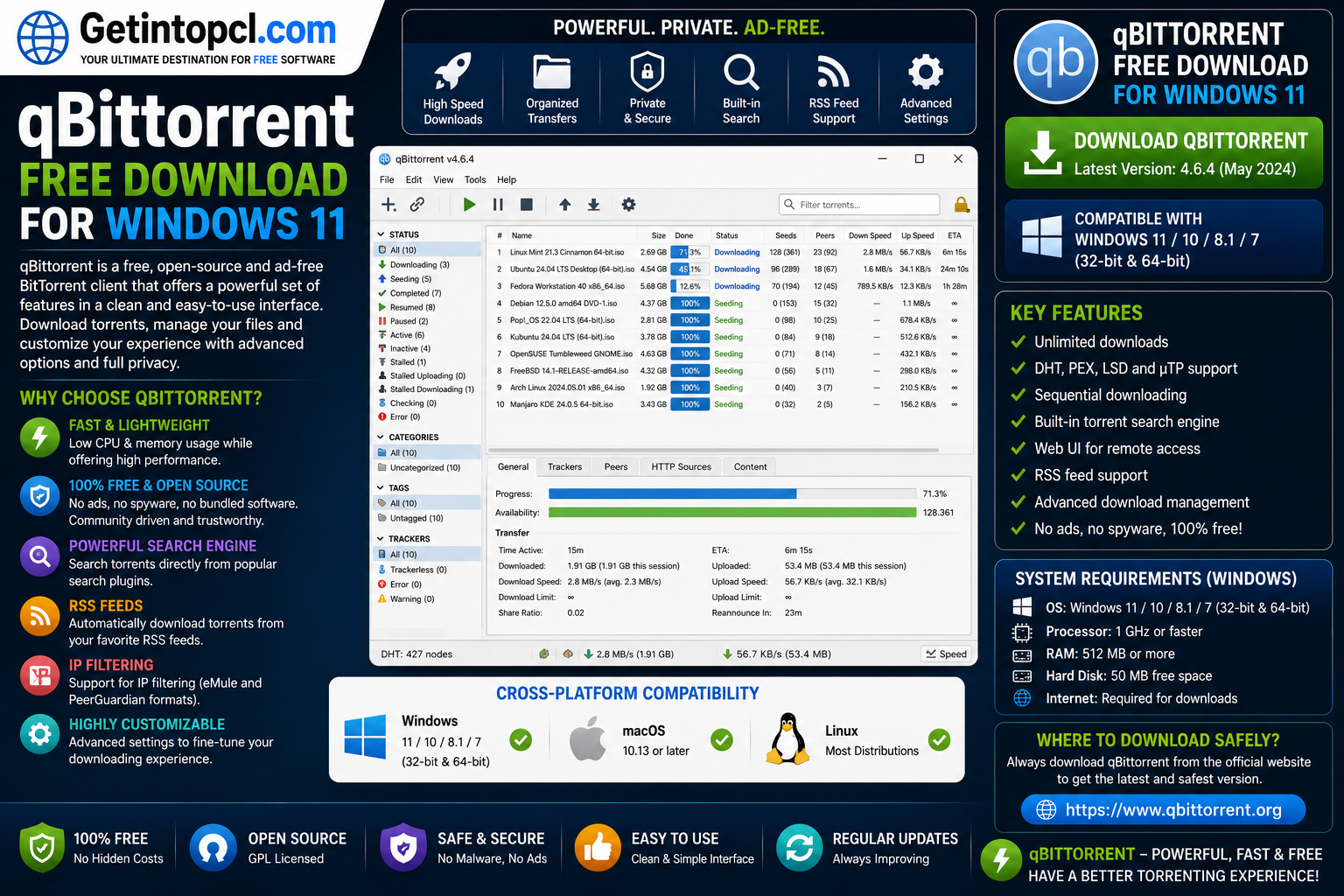
qBittorrent Free Download for Windows 11 is a popular choice for users looking for a free and open-source BitTorrent client with a clean interface and a wide range of torrent-management features. The software is developed by the qBittorrent project and community contributors, with development led through an open-source project.
qBittorrent is designed to download and share files using the BitTorrent peer-to-peer protocol. It supports traditional .torrent files and magnet links, allowing users to connect with other peers and download pieces of a file from multiple sources.
The program is intended for downloading and sharing legally authorized content, such as Linux distributions, open-source applications, public-domain media, research data, and other files that creators or copyright holders have made available through BitTorrent. Users remain responsible for ensuring that the content they download or share is legal and authorized.
For people searching for a free torrent client for Windows, qBittorrent is notable because it provides its main features without requiring a paid subscription or premium upgrade. It is available for Windows, macOS, Linux, and other supported platforms through official and community-maintained distribution channels.
This article covers qBittorrent download for Windows 11, including its features, compatibility, system requirements, licensing, advantages, limitations, and safe download options.
What Is qBittorrent and What Is It Used For?
qBittorrent is a BitTorrent client that provides tools for downloading, uploading, and managing torrent transfers. It is often used as a lightweight alternative to other torrent clients because it focuses on core torrent functionality without requiring users to purchase a premium edition.
The application can connect to a BitTorrent swarm, where different users share portions of a file with one another. When a user downloads a torrent, qBittorrent can retrieve different pieces of the file from multiple available peers.
Major uses of qBittorrent include:
- Downloading authorized torrent files.
- Opening magnet links.
- Uploading and seeding files.
- Managing multiple torrents simultaneously.
- Controlling download and upload speeds.
- Prioritizing individual torrents and files.
- Creating torrent files.
- Using RSS feeds for automated downloads.
- Searching for torrents through supported search plugins.
- Managing torrents remotely through a web user interface.
qBittorrent aims to provide an alternative to traditional torrent clients while maintaining a familiar and easy-to-use interface. Its functionality makes it suitable for both casual users and more advanced users who need greater control over peer-to-peer transfers.
Key Features of qBittorrent
1. No Required Premium Subscription
One of the main advantages of qBittorrent free download is that the software is available without a separate Pro or Premium edition required to unlock the core functionality.
Users can access torrent management features without paying a recurring subscription.
2. Clean and Familiar Interface
qBittorrent uses a traditional desktop interface that makes it easier to monitor active, completed, paused, and seeding torrents.
Users can view information such as:
- Download speed.
- Upload speed.
- Connected peers.
- Seeds and leechers.
- File progress.
- Remaining download time.
- Torrent status.
3. Support for Torrent Files and Magnet Links
Users can add standard .torrent files or magnet links. Magnet links make it possible to begin downloading without first saving a separate torrent metadata file.
4. Bandwidth Control
qBittorrent allows users to configure global and per-torrent speed limits.
This feature can be useful when a torrent is consuming too much of the available internet connection. Users can limit upload and download speeds so other applications can continue using the network.
5. Torrent Queueing and Prioritization
Users can manage multiple transfers by adjusting torrent priority and queue settings. This allows important downloads to receive more attention while less urgent torrents wait.
6. Integrated Torrent Search
qBittorrent includes a search feature that can work with supported search plugins. This feature can help users search available torrent indexes from within the application.
Users should still verify that any content they download is authorized and legal.
7. RSS Feed Support
The software supports RSS feeds and filtering rules that can automate selected downloads.
This feature can be particularly useful for users who regularly download legally distributed content from RSS-enabled sources.
8. Remote Management Through Web UI
qBittorrent includes a web user interface that can allow users to manage torrents remotely through a compatible web browser when properly configured.
9. Torrent Creation
Users can create their own torrent files and share authorized content through the BitTorrent protocol.
10. Advanced Network Features
qBittorrent supports a range of BitTorrent-related technologies and configuration options. Depending on the version and settings, these can include peer discovery, encryption options, IP filtering, proxy support, and other advanced controls.
qBittorrent Windows 11 Compatibility
For users searching for qBittorrent Windows 11 compatibility, the software provides official Windows builds that can be used on modern versions of Microsoft Windows.
The official qBittorrent website provides Windows installers and currently lists supported Windows versions on its download pages and release information. Windows users should select the correct installer architecture, such as 64-bit, when applicable.
Windows 11 is supported by current qBittorrent releases designed for modern Windows systems. However, users should always check the official download page for the latest version and current platform requirements before installation.
Older versions of qBittorrent may support different versions of Windows, and compatibility can change as the project updates its underlying dependencies.
qBittorrent for macOS Compatibility
qBittorrent for Mac is available, but compatibility can depend on the qBittorrent release and the version of macOS being used.
The project provides information and download options for macOS through its official website. Users should select a release compatible with their Mac hardware and operating system.
Modern macOS security requirements and processor architecture can affect installation. Therefore, users with Apple Silicon or older Intel-based Macs should verify the available build and compatibility information before downloading.
Unlike some commercial torrent clients, qBittorrent does not separate its main functionality into a paid Mac edition. The software remains free to use under its open-source license.
qBittorrent for Linux Compatibility
qBittorrent for Linux is widely available for many Linux distributions.
Depending on the distribution, qBittorrent may be available through:
- Official distribution repositories.
- Software centers or package managers.
- Flatpak repositories.
- Snap packages.
- Other supported package sources.
Availability and package versions can vary between Linux distributions. A distribution repository may provide an older version than the latest release published by the qBittorrent project.
Linux users should preferably use their distribution’s trusted package manager or follow installation instructions provided through the official qBittorrent documentation.
qBittorrent System Requirements
The qBittorrent project does not generally publish a simple consumer-style list of minimum and recommended hardware requirements covering processor speed, RAM, storage capacity, and graphics hardware.
For this reason, exact specifications should not be invented.
Minimum Requirements
Officially published minimum hardware specifications may vary by operating system and qBittorrent release.
The following general requirements apply:
- Operating System: A supported version of Windows, macOS, or Linux compatible with the selected qBittorrent release.
- Processor: No universal official minimum processor specification is clearly established for all current releases.
- RAM: No single official minimum RAM requirement is generally published.
- Storage: Sufficient storage is required for the application and the torrent files being downloaded.
- Graphics: No dedicated graphics card is normally required for standard desktop use.
- Internet Connection: A stable internet connection is required to connect with peers and transfer torrent data.
- Network Access: Firewall, router, proxy, or security settings may need to allow qBittorrent network communication.
Recommended Requirements
The project does not publish a universal recommended specification for processor, RAM, graphics, or storage.
For normal use, the most important practical requirements are:
- A currently supported operating system.
- Enough RAM to comfortably run the operating system and active applications.
- Adequate storage for downloaded content.
- A stable broadband internet connection.
- Sufficient network bandwidth for the number of active torrent transfers.
Resource usage may increase when many torrents, peers, RSS rules, or other features are active simultaneously.
Is qBittorrent Free or Paid?
qBittorrent is free and open-source software.
The project does not use the typical freemium model found in some commercial torrent applications. There is no standard qBittorrent Pro, Premium, or subscription tier required to access the primary features.
The software is distributed under the GNU General Public License, allowing users to use, study, modify, and distribute the software according to the terms of the license.
Because qBittorrent does not have separate official paid editions, there is no free-versus-premium feature restriction table similar to commercial torrent software.
| Version | Price | Main Features |
|---|---|---|
| qBittorrent | Free | Torrent downloads, magnet links, bandwidth controls, RSS, search plugins, Web UI, torrent creation, and other core features |
| Official Premium Version | Not available | No official Pro or subscription edition |
This simple model is one reason qBittorrent is frequently considered a strong qBittorrent alternative to torrent clients that use advertising or paid feature upgrades.
Advantages of qBittorrent
Completely Free
The main application is available without requiring a subscription to unlock its standard features.
No Official Premium Upselling
Users do not need to choose between Basic, Pro, Ad-Free, or VPN packages offered by the qBittorrent project.
Cross-Platform Availability
qBittorrent is available for Windows, macOS, and Linux, although installation methods and version compatibility can differ between platforms.
Advanced Torrent Controls
Users can control bandwidth, priorities, queues, connections, and other torrent-related settings.
RSS and Automation Features
RSS support can help automate selected downloads based on configured rules.
Web User Interface
The Web UI provides an option for remotely managing torrent activity through a browser.
Torrent Creation
Users can create and distribute torrent files for authorized content.
Open Development Model
The project is developed as open-source software, allowing the source code and development process to be publicly accessible.
Limitations of qBittorrent
Despite its strengths, qBittorrent may not be ideal for everyone.
- The interface may feel technical for complete beginners.
- Advanced configuration options can be confusing.
- Hardware requirements are not published as a simple minimum/recommended specification list.
- Search functionality depends on plugins and external torrent sources.
- Package availability and versions can differ across Linux distributions.
- Performance depends on internet speed and the availability of peers and seeders.
- Downloading files from untrusted torrent sources can expose users to malicious or unwanted content.
Users should remember that qBittorrent is only a torrent client. The application does not guarantee that files shared through external torrents are safe or legal.
DriectX12 Ultimate Download Latest Version 2026 For Windows 11/10 (64 Bit)
Who Is qBittorrent Best Suited For?
qBittorrent is particularly suitable for:
- Windows 11 users looking for a free torrent client.
- Users who prefer software without a required premium subscription.
- Linux users who want a native desktop torrent application.
- Users who need bandwidth management.
- People who download large legally distributed files.
- Advanced users who want RSS automation.
- Users who need remote torrent management.
- People looking for an alternative to ad-supported torrent clients.
It may be less suitable for users who prefer an extremely simplified interface with minimal settings or who are uncomfortable configuring networking and torrent-related options.
Where to Download qBittorrent Safely
The safest place to download qBittorrent safely is the official qBittorrent website.
The official website provides download information for Windows, macOS, and Linux. Windows users should select the appropriate current installer, while Linux users may prefer packages supplied by their distribution or installation methods recommended by the qBittorrent project.
Avoid downloading modified, cracked, repacked, or unofficial versions of qBittorrent from unknown websites.
When downloading and installing torrent software:
- Use the official developer website whenever possible.
- Prefer trusted package repositories on Linux.
- Check the software version before installing.
- Keep your operating system updated.
- Use reputable security software where appropriate.
- Download only authorized content through BitTorrent.
- Scan downloaded executable files before opening them.
Frequently Asked Questions
Is qBittorrent free?
Yes. qBittorrent is free software and does not have an official Pro or Premium subscription tier for unlocking its primary features.
Does qBittorrent work on Windows 11?
Yes. Current qBittorrent releases provide support for modern Windows systems, including Windows 11. Users should download the latest compatible version from the official website.
How much RAM does qBittorrent need?
The project does not publish a universal minimum or recommended RAM requirement. Actual memory usage depends on the number of active torrents, peers, and other running applications.
How much storage space does qBittorrent require?
No universal official minimum storage requirement is generally specified. You need space for the application itself and sufficient additional storage for the files you plan to download.
Is qBittorrent available for Mac?
Yes. qBittorrent is available for macOS, although supported versions and installation options can depend on the current release and your Mac hardware.
Is qBittorrent available for Linux?
Yes. qBittorrent is available for Linux through various distribution repositories and supported installation methods. The available version may vary depending on the Linux distribution.
Is qBittorrent safe to download?
Downloading qBittorrent from its official website or trusted Linux repositories is the safest option. However, users should separately evaluate the safety of files downloaded through torrents because torrent content can come from third-party peers.
Where can I download qBittorrent?
You can download qBittorrent from the official qBittorrent website or use a trusted package repository for your Linux distribution. Avoid unauthorized, modified, or pirated installers.
Conclusion
qBittorrent Free Download for Windows 11 is a strong option for users who want a capable torrent client without advertisements, subscriptions, or feature tiers imposed by the official project. Its support for torrent files, magnet links, bandwidth controls, RSS feeds, torrent creation, search plugins, and remote management makes it useful for both basic and advanced users.
The software is also available across Windows, macOS, and Linux, although compatibility and installation methods can vary depending on the operating system and software version.
Before installing, always verify compatibility and download the application from a trusted source. For visitors looking for other useful software and Windows applications, Getintopcl.com can also help you discover the products you need. Always use legitimate software sources and download only authorized content.